Monday, 29 November 2010

Oh no, another Santa tag!!

Over on the Simon Says Stamp & Show Challenge blog today the new theme is "make a tag". I'm really loving all of the vintage Christmas images that Tim Holtz has released through Stampers Anonymous, so I thought I'd give this Santa an outing :)

He was stamped with Fired Brick and Black distress inks and then coloured with a red pen. Rock Candy stickles was used to give some sparkle to the ornaments. I planned on doing a whole lot more to this tag, but when I got to this stage I thought that adding more would spoil it rather than improve it, so I left it as it was!

Our ever-generous sponsor Simon Says Stamp is offering a $25 gift voucher again this week! The winner will be chosen at random from those who enter the challenge, so why not give it a try?


Saturday, 27 November 2010

Freebie #58!

Christmas Village House
[ETA - This file is no longer available here]

Another Friday, another freebie!

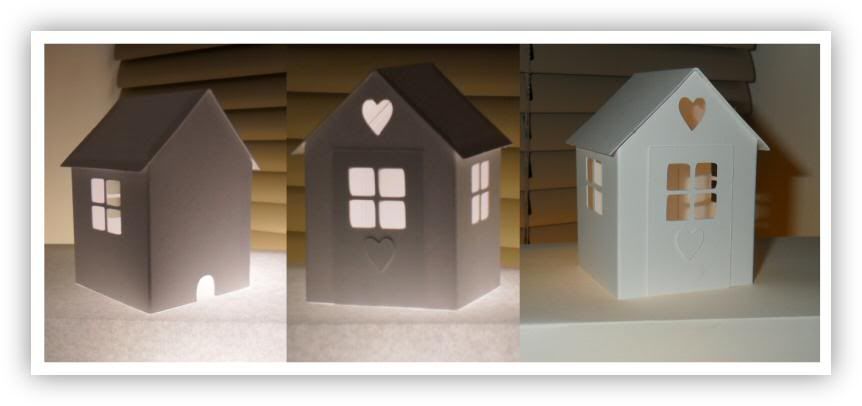
So many of you liked this house when I posted it the other day that it was pretty clear what my freebie should be this week! :)

The house in the photos was sized so that I could fit 2 on 1 sheet of A4 or letter card.

Please remember you are only allowed to download this file for your own use and may not share it or distribute it to others in any form. I spend a great deal of time creating my designs, please respect the terms under which they are shared.

Again, this template will be "live" for 1 week. Next week it will be taken down. Don't forget, if you have any requests, pass them on! I can't promise, but I will take suggestions into account when planning future templates.

These files may not be uploaded to a group, forum or website for sale or redistribution, or shared among individuals. They are expressly for the personal use of each person that downloads them from this blog.

There are 2 files and I have put it into a zip file to make downloading easier. After saving it, open in the usual way, and drag the file out onto your desktop or wherever you wish to save it.

There are 2 versions of each template:
  • An SVG version which can be imported into the Sure Cuts a Lot or Make the Cut program and then cut out on your Cricut.
  • A DXF version which is Craft Robo friendly, and ready to be imported into your Robomaster software (I'm not a Robo user, so if there are any problems with this, please let me know!)
Simply click on the appropriate button below to download the file!

Any feedback on the templates is more than welcome, and if you have any suggestions for possible future templates you'd like to see, please let me know! If you make anything using one of the templates, please post a link to it here so that others can be inspired by how you've used them!

I hope you like the templates - let me know how you get on! :)

Templates © dan99crafter@gmail.com 2010

Friday, 26 November 2010

Just hear those sleigh bells ring-a-ling!

I'm not sure why I've picked that title, there's not a sleigh in sight here, but the song is in my head right now so that will have to be reason enough! :)

The tag, reindeer and "believe" were cut on the Cricut. (The reindeer I think was designed by Denise from Boca - I've contacted her to confirm that, and if it is I will put in a proper credit and link).

All stamps were Tim Holtz @ Stampers Anonymous and colour was mostly distress ink pads, with a bit of promarkery thrown in for good measure! Rock Candy stickles was wiped over the letters. As ever, click on the image for a larger view. Comments welcomed! :)

Thursday, 25 November 2010

If I knew one end of a saw from the other...

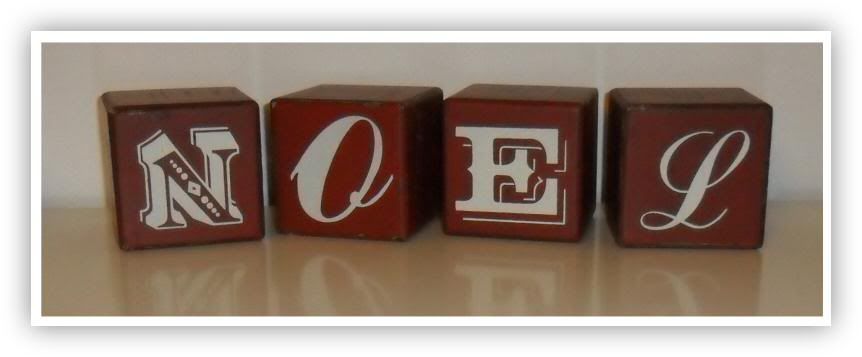
... perhaps I'd be able to try and make these for myself! Unfortunately I don't, so I had to buy these wooden blocks when I saw them in a shop today. They're all scuffed and scratched up - goodness knows I spend enough time doing that to the things that I make myself that I couldn't resist these! :) Plus, they've set wheels in motion in my head, which is never a bad thing :)

Wednesday, 24 November 2010

A Christmas Village Starts with 1 House...

I've meant to do this for a couple of years or so now, create my own Christmas village to go under my Christmas tree. Designed in Inkscape then cut on the Cricut using the SCAL program, this is the first house I've made, and I must say I'm pretty happy with it!

I stood it on a light box so I could get an idea of what it would look like with a little light inside it. I left a small mouse hole on the back of the house for the wires to go in and out of. I haven't decided if I'm going to leave them all white, make them all kraft or make them from patterned cardstock. How would you make yours? I hope you like it, click the image for a larger view :)

ETA: To answer Anonymous's question, yes, this was cut from white cardstock, but it's very heavy weight. I don't know what it would be in the US pounds system, but here in Europe it's probably 240 or 300 gsm.

Tuesday, 23 November 2010

A Christmas Card for the 21st Century

I decided that I was going to make a Christmas card for today's post, so I was sitting at my desk, thinking about Santa, angels, holly, bells - all the usual components of such things.

My mind started to focus on angels and the realisation that the angels we frequently see in Christmas cards, dressed in flowing gowns, are only dressed that way because that was how people dressed at the time they were painted. Likewise the hairstyles, ethnicity and so many other characteristics of a traditional angel are really only things that were reflections of the taste and norms of their time.

I decided to make an urban, modern Christmas card, showing an angel that demonstrated a more contemporary style, and this is what I came up with. I'd like to think that 21st century angels might look a bit like this! I hope you like it :) All comments welcomed!

(By the way, see that strip of Cosmo Cricket cardstock? I have held onto that for 3 years and this is the first time I've used it - it almost killed me to cut into it - I know a lot of you will know the feeling! LOL)

ETA: The main image is by PaperArtsy, from their Urban Snapshots range (www.paperartsy.co.uk)

Monday, 22 November 2010

"Alive"

Over on the Simon Says Stamp & Show Challenge blog today the new theme is "Distress Inks". I've had the song "Alive" by the Psychedelic Furs going around in my head for several days now, so hopefully this will help me to forget it! :) Although I think this piece works on it's own, the lyrics might give you a clearer picture of what was going through my head as I created each tile. Start from the top left corner and work left to right :)

"One time, just for a moment, I had time on my side. I felt like one in a million, I fell out of the blue. I feel dumb, I can't speak, I feel blind, I can't see. All my life. Some days are wide as the ocean, sun goes down and it's gone. I'll be sad when it's over, I'll be down when it's done. For once in my lifetime I'm not sad. For once in my lifetime I'm not down. For once in my life."

The background tiles were distress inked and some were water-stamped. Glossy accents were used to create tears on one of the tiles. I hope you like it, as ever, click on the image for a larger view :) All comments appreciated! :)

Our ever-generous sponsor Simon Says Stamp is offering a $25 gift voucher again this week! The winner will be chosen at random from those who enter the challenge, so why not give it a try?


Saturday, 20 November 2010

Freebie #57!

Rosette and centre

[These files are no longer available here]

Just when you'd thought there weren't going to be any more freebies! :)

There are so many of these rosettes floating around the internet at the moment, largely due to that fact that they were recently re-popularised by Tim Holtz when he released one as part of his range of Sizzix dies. A few days ago, a friend on one of the forums I belong to asked me if I would design a rosette for her that she could use in SCAL. Once it was finished, it only made sense to share it here too :)

I've included files for the rosette itself and for the zig-zag edged centre circle. I added them separately so that you could easily change the size of one to suit your needs without having to resize the other if you didn't want to :) I've also included folding notches to make the folding easier, but if you don't want these just cut the shape in blackout mode. Remember to cut an extra circle to glue on the underside of your rosette so that it keeps it's shape!

Please remember you are only allowed to download this file for your own use and may not share it or distribute it to others in any form. I spend a great deal of time creating my designs, please respect the terms under which they are shared.

Again, this template will be "live" for 1 week. Next week it will be taken down. Don't forget, if you have any requests, pass them on! I can't promise, but I will take suggestions into account when planning future templates.

These files may not be uploaded to a group, forum or website for sale or redistribution, or shared among individuals. They are expressly for the personal use of each person that downloads them from this blog.

There are 2 files and I have put it into a zip file to make downloading easier. After saving it, open in the usual way, and drag the file out onto your desktop or wherever you wish to save it.

There are 2 versions of each template:
  • An SVG version which can be imported into the Sure Cuts a Lot or Make the Cut program and then cut out on your Cricut.
  • A DXF version which is Craft Robo friendly, and ready to be imported into your Robomaster software (I'm not a Robo user, so if there are any problems with this, please let me know!)
Simply click on the appropriate button below to download the file!

Any feedback on the templates is more than welcome, and if you have any suggestions for possible future templates you'd like to see, please let me know! If you make anything using one of the templates, please post a link to it here so that others can be inspired by how you've used them!

I hope you like the templates - let me know how you get on! :)

Templates © dan99crafter@gmail.com 2010

Friday, 19 November 2010

A (Gr)inchie Christmas Card

I hesitate to call this a Christmas card, as it was thrown together with so little effort I'm embarrassed! Having said that, I didn't set out to make a card at all, I had realised earlier that I hadn't stamped some of the Inkadinkado clear stamps I got a few weeks back, so had a little play with them to see how they'd turn out. I don't plan on sending this out to anyone, but it gave me a chance to play around with arranging the images and see how they worked in relation to each other. Having said that, there is a LOT of Rock Candy Stickles glitter on this, and it looks a whole lot better in the flesh than it does in this scan! :)

Thursday, 18 November 2010

Hints from the Hopeless, #38

Black and grey do not work well as prominent colours in a potential Christmas card.

Oh, and while I've got your attention, accidentally making Santa wear badly applied make-up in an attempt to make him more jolly-looking is also a less than successful approach to adopt! lol


Best wishes, Dan x
Making the mistakes first, so you don't have to!
Related Posts with Thumbnails