Showing posts with label Cricut. Show all posts

Monday, 19 November 2012

It's great to be grateful!


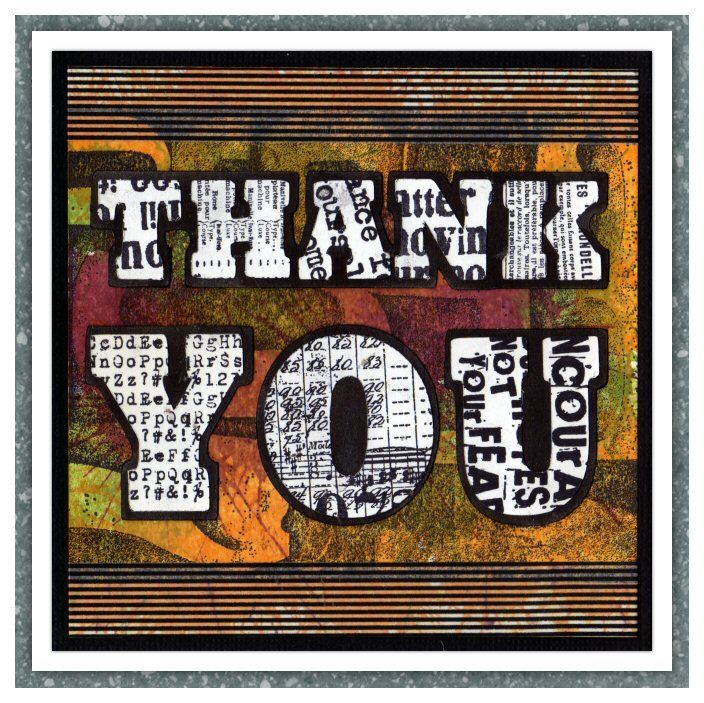
The theme over on the Simon Says Stamp and Show Challenge is "Thank You".  I don't know about you, but I love typography - in fact, I'd say I looooooooove it, and I can spend hours sifting through font sites drooling over all the goodies that are available!  I decided to make a bold typographic statement with this card, though it didn't quite turn out the way I had planned.

Originally, I was going to colour the letters but after stamping them I decided I really liked the in-your-face starkness of the black and white characters and left them as they were.  It also makes for a great contrast with the richly coloured background, so RESULT! :)  In case you were wondering, the font is Rockwell Extra Bold, though I think I stretched it vertically a little before cutting it out on my Cricut.

I started out by stamping the number background in black and then coloured it by playing whach-a-mole on my card with some colours of Distress Stains.  After cutting out the letters and the shadow layer, I stamped on the letters with the Going Somewhere, Dance Card and Steampunk stamp sets.  The whole thing was matted onto black card and then onto my white card blank. I think if you're going to say "thank you", you might as well say it as loudly as you can, and I think this card certainly does that! :)

Supplies I used included:

Our ever-generous sponsor Simon Says Stamp is offering a $50 gift voucher as the prize again this week, just make something for the challenge and you could the winner! The winner will be chosen at random from those who enter the challenge, so why not give it a try? At the very least why not head over to the Challenge Blog to see how the other members of the design team have interpreted this weeks theme! :)

Don't forget, Simon Says Stamp have a great Facebook page too!  Check them out here!


Monday, 25 June 2012

See No Evil, Hear No Evil, Speak No Evil


This weeks theme on the Simon Says Stamp and Show Challenge is "Depths of Distress".   A few days back I was watching news reports about both the Eurozone crisis and the collapse of parts of the banking industry in various places around the world and it started one or two wheels turning in my head, but then I eventually thought no more of it.  When it came time to think about this week's challenge I had this idea of making an updated version of the Japanese proverb of the 3 Wise Monkeys - "See no evil, hear no evil, speak no evil".  Luckily, in my house mansion, apart from my craft room, an entire wing of my spacious estate is devoted solely to stamps of animals and 3 of the rooms contain my entire collection of monkey stamps in various positions :)

A-n-y-w-a-y... long story short, on my way to my stampatorium I kept getting lost between my golf course and private day spa. Without access to my collection of monkey stamps, I had to abandon the monkey idea completely! That's when I thought back to the banking stuff I had been watching on tv and although they'd used different terminology, it wasn't a huge leap to realise that one thing the interviewed bankers kept implying was that they'd seen no evil, heard no evil and spoken no evil.  So there you have it, three '50s type bankers, complete with stylish modern accessories representing an update to the ancient Japanese proverb!

I spritzed the background card with a little water then dabbed on spots of Distress Stain all over it.  When it was dry I went over it with a few layers of white Distress Stain to soften the colour and stamped the Tim Holtz numbers stamp on top, finally finishing with more white Distress Stain.  I also wiped it with a baby wipe to make it a little more grainy.

I cut out the suits and hats from a sheet of Kraft Resist paper and coloured them with Distress Ink (you could also use Distress Stain but Distress Ink pad and blending tool give a much stronger contrast in the glazed areas of the Kraft Resist).  The shirts and ties were cut freehand with scissors (I didn't even draw them first, I just kept snipping until they looked right.  I know, I know, crafting without a safety net - I live life on the edge!).  The ties were coloured with Barn Door Distress Ink.

I stamped the clowns from the Big Top stamp set and cut out the central face from each image and coloured them with Promarkers.  The accessories were cut from black cardstock and I cut the ipod from black and white card and added twisted wires for the headphones.  I cut a half inch from the bottom of the two background figures so that the added height of the middle figure would make it look like the group was looming threateningly over the viewer.  The two background figures were mounted on black foam to raise them above the background, then the middle figure was further mounted above the duo behind.  I mounted the whole piece onto black card and then onto the front of a white greeting card blank.

So there you have it, a bit of crafting, a bit of Japanese religious history and a bit of topical commentary on society - what more can you want?  lol

Apology:  It has been brought to my attention that some parts of my story in the first two paragraphs are out-and-out lies - specifically in the parts that mention my home.  I've read and re-read it but try as I might I can't find anything wrong.  Still, I'd be failing in my duty, dear reader, if I didn't point it out to you!

Our ever-generous sponsor Simon Says Stamp is offering a $50 gift voucher as the prize again this week, just make something for the challenge and you could the winner! The winner will be chosen at random from those who enter the challenge, so why not give it a try? At the very least why not head over to the Challenge Blog to see how the other members of the design team have interpreted this weeks theme! :)


Saturday, 24 March 2012

Freebie #67!

The Pirate Collection!
This week's freebie is this fun pirate gear, here modelled oh-so-stylishly by yours truly! lol  Great fun for dressing up any family photos you want to scrap! :)

Please remember you are only allowed to download these files for your own use and can not share them or distribute them to others in any form. I spend a great deal of time creating my designs, please respect the terms under which they are shared.

Don't forget, if you have any requests, pass them on! I can't promise, but I will take suggestions into account when planning future templates.

These files may not be uploaded to a group, forum or website for sale or redistribution, or shared among individuals. They are expressly for the personal use of each person that downloads them from this blog.

There is one file and I have put it into a zip file to make downloading easier. After saving it, open in the usual way, and drag the files out onto your desktop or wherever you wish to save them.

There are 2 versions:
  • An SVG version which can be imported into the Sure Cuts a Lot, Ecal or Make the Cut program and then cut out on any of the machines supported by SCAL, Ecal and Make the Cut.
  • A DXF version which is Craft Robo friendly, and ready to be imported into your Robomaster software (I'm not a Robo user, so if there are any problems with this, please let me know!)
Simply click on the appropriate button below to download the file!

Any feedback on the templates is more than welcome, and if you have any suggestions for possible future templates you'd like to see, please let me know! If you make anything using one of the templates, please post a link to it here so that others can be inspired by how you've used them!

I hope you like the templates - let me know how you get on! :)

Files © dan99crafter@gmail.com 2012

Saturday, 17 March 2012

Freebie #66!

Hooray for Hollywood!

I've started to make my files available from my blog again and am adding a new set each week. Check out the "Cutting Files" tab at the top of the page to see which ones are available for download.

This week's freebie is these two film strip die-cuts, perfect for scrapping those movie night photos or using as a fun frame!

Please remember you are only allowed to download these files for your own use and can not share them or distribute them to others in any form. I spend a great deal of time creating my designs, please respect the terms under which they are shared.

Don't forget, if you have any requests, pass them on! I can't promise, but I will take suggestions into account when planning future templates.

These files may not be uploaded to a group, forum or website for sale or redistribution, or shared among individuals. They are expressly for the personal use of each person that downloads them from this blog.

There are 2 files and I have put them into a zip file to make downloading easier. After saving it, open in the usual way, and drag the files out onto your desktop or wherever you wish to save them.

There are 2 versions:
  • An SVG version which can be imported into the Sure Cuts a Lot, Ecal or Make the Cut program and then cut out on any of the machines supported by SCAL, Ecal and Make the Cut.
  • A DXF version which is Craft Robo friendly, and ready to be imported into your Robomaster software (I'm not a Robo user, so if there are any problems with this, please let me know!)
Simply click on the appropriate button below to download the file!

Any feedback on the templates is more than welcome, and if you have any suggestions for possible future templates you'd like to see, please let me know! If you make anything using one of the templates, please post a link to it here so that others can be inspired by how you've used them!

I hope you like the templates - let me know how you get on! :)

Files © dan99crafter@gmail.com 2011

Monday, 16 January 2012

What will I be when I grow up?

#4 - CEO of a multinational corporation


This is part 4 of an occasional series called "What will I be when I grow up?".  I think it pretty much speaks for itself! :)  The theme over on the Simon Says Stamp and Show Challenge blog this week is "anything but a card", and since this isn't a card I think it qualifies :)

I designed the Grouch Marx disguise on the computer and cut it out on the Cricut, then got busy with Tim Holtz stamps and Claudine Hellmuth paints! :)

Our ever-generous sponsor Simon Says Stamp is offering a $50 gift voucher as the prize again this week! The winner will be chosen at random from those who enter the challenge, so why not give it a try? At the very least why not head over to the Challenge Blog to see how the other members of the design team have interpreted this weeks theme! :)

Monday, 2 January 2012

Roll Up! Roll Up! Come See the Main Attraction!

This weeks theme on the Simon Says Stamp and Show Challenge is "Something Old, Something New". The old thing in my piece is the leftover configurations element I used, and the new was two of Tim Holtz's recent limited edition Distress Ink colours.

I started by covering the frame I was using with a couple of layers of gesso, applied with a baby wipe so that they'd be nice and thin with no brush strokes.  I dried the frame with a heat gun between layers.

Next, I stamped the "rays" with Festive Berries distress ink and then used a yellow Promarker to colour the gaps between them.  I used a blending tool to cover the frame with a generous layer of Gathered Twigs distress ink, and stamped lots of scratches and splodges, also with Gathered Twigs ink.

I cut the circus awning on the Cricut and coloured it with Promarkers, then coloured the configurations box with an Umber Promarker, to tie in with the background panel (from the Tattered Time stack) and the brown I'd used to age the frame.  I lined the inside of the box with black card and stamped, coloured and cut out the clown and fixed him in place.

I really had a lot of fun completely distressing the frame, lol  My hands were good and inky by the end of it, thank goodness for craft scrubbies! :)

Our ever-generous sponsor Simon Says Stamp is offering a $50 gift voucher as the prize again this week! The winner will be chosen at random from those who enter the challenge, so why not give it a try? At the very least why not head over to the Challenge Blog to see how the other members of the design team have interpreted this weeks theme! :)

Monday, 12 December 2011

I Believe in Father Christmas

This weeks theme on the Simon Says Stamp and Show Challenge is "Through the Looking Glass - Projects with Depth".  This 3D diorama card is over 2 inches deep, so fits the challenge perfectly!  This has always been one of my favourite Christmas songs, though when you actually listen to it it's kinda depressing! LOL  The Polar Express movie played it's part in the inspiration for this too :)

 I've used rock candy stickles on the snowflakes and it always saddens me that the sparkly frostiness of it is never done justice in a photo!  White enamel accents that I used for the snow on the tree branches is wonderfully dimensional, but alas that too is lost in this picture!


Our ever-generous sponsor Simon Says Stamp is offering a $50 gift voucher as the prize again this week! The winner will be chosen at random from those who enter the challenge, so why not give it a try? At the very least why not head over to the Challenge Blog to see how the other members of the design team have interpreted this weeks theme! :)

Saturday, 3 December 2011

A quick holiday gift and a freebie revisited (now includes print/scissors version!)

These files are no longer available from this blog. Use the "Contact Me" button if you need files you have seen here or elsewhere on my blog. 

Those of you who follow my blog regularly will know that I make my designs available for download here for 1 week and then I remove them.  As the holidays are approaching fast I thought I'd make a change and repost a file from last April, which I thought would be perfect for a quick holiday gift!
I know that we all put a lot of love and care into the cards we make, using a range of interesting techniques and materials, but this is definitely not about that, speed is the essence here!  This is about "Oh no, I need a gift for DS2's teacher by 8am tomorrow, what am I gonna do???".  

I'm sure that like me you have waaaaay more sheets of patterned cardstock and paper than you will ever use!  Many of them are lovely enough to stand on their own as the front of a simple card, so when time is short, why not let them help you out?  

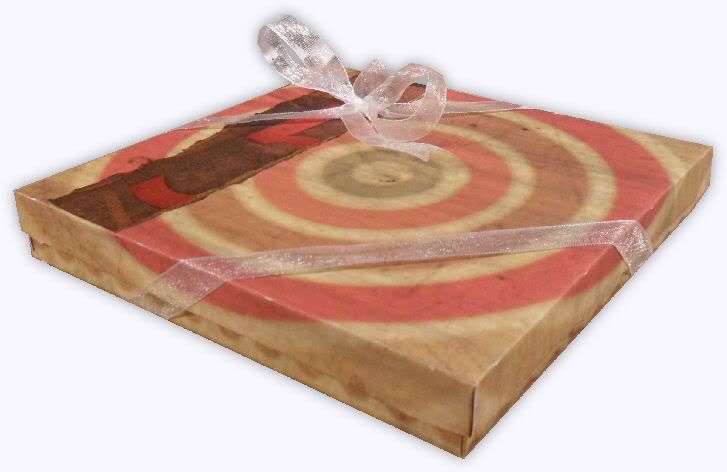
With a little forward planning (keep a few pre-cut boxes aside, ready to go when you need them) there's no reason why you shouldn't have a nice gift ready to go in less than an hour! It took me only 30 minutes to assemble this box and make 10 simple cards to go inside it.  I used plain white 5x5 cards and envelopes which were 50 for £4, or 8p (12 US cents) each, with a matte and panel on each cut from my ever growing mountain of cardstock.  Let's be honest, the cards aren't going to win any craft prizes, but the if the papers you use are lovely, then the cards are perfectly presentable!  How often have we all seen plain cards just like these in museum gift shops or artsy stores?

Here's a quick video demo of how to fold and construct the boxes. It shows the construction of the base, but the lid is assembled in exactly the same way.


Here is a size guide that shows what size you need to cut each template to produce a particular size of box. Sizes are in inches!
Box size Base w/h Lid w/h
3 x 3 5.2 4.77
3.5 x 3.5 6.04 5.54
4 x 4 6.9 6.3
4.5 x 4.5 7.76 7.06
5 x 5 8.62 7.85
5.5 x 5.5 9.5 8.625
6 x 6 10.34 9.38
6.5 x 6.5 11.22 10.14

Please remember you are only allowed to download these files for your own use and can not share them or distribute them to others in any form. I spend a great deal of time creating my designs, please respect the terms under which they are shared.

Don't forget, if you have any requests, pass them on! I can't promise, but I will take suggestions into account when planning future templates.

These files may not be uploaded to a group, forum or website for sale or redistribution, or shared among individuals. They are expressly for the personal use of each person that downloads them from this blog.

There are 3 files and I have put them into a zip file to make downloading easier. After saving it, open in the usual way, and drag the files out onto your desktop or wherever you wish to save them.

There are 3 versions:
  • An SVG version which can be imported into the Sure Cuts a Lot or Make the Cut program and then cut out on any of the machines supported by SCAL and Make the Cut.
  • A DXF version which is Craft Robo friendly, and ready to be imported into your Robomaster software (I'm not a Robo user, so if there are any problems with this, please let me know!)
  • A Printable version which can be imported into your graphics or Word program, sized to suit your needs, printed and then cut out with scissors or a craft knife.
Simply click on the appropriate button below to download the file!

Any feedback on the templates is more than welcome, and if you have any suggestions for possible future templates you'd like to see, please let me know! If you make anything using one of the templates, please post a link to it here so that others can be inspired by how you've used them!

Monday, 10 October 2011

Wings Ain't What They Used to Be!

Don't you just hate it when the one-eyed flying cyclops hearts you've been keeping in an old bird cage finally chew their way out?  I know I do!  That's why, when I saw that this week's Simon Says Stamp and Show Challenge is "Things With Wings" I decided to work through my frustration by making a piece about it!  :)  I know lots of you out there have the same problem, so believe me when I say I feel your pain! lol

This actually took me quite a few days to make, simply because I'm the world's slowest cutter-out!  All of the detail in the wings seemed to take forever to do, but it was worth it in the end :)

Our ever-generous sponsor Simon Says Stamp is offering a $50 gift voucher as the prize again this week! The winner will be chosen at random from those who enter the challenge, so why not give it a try? At the very least why not head over to the Challenge Blog to see how the other members of the design team have interpreted this weeks theme! :)

Wednesday, 17 August 2011

Craft Room Wall Art

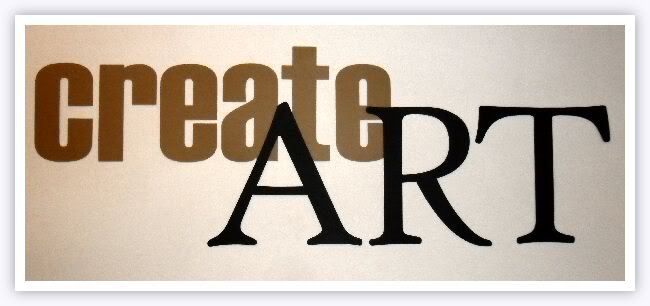
Isn't it amazing what you can do with 2 sheets of brown card, 3 of black, a Cricut with SCAL and 15 minutes? This is on the wall of my craft room, above my desk - hopefully it will inspire me! :)

Monday, 11 July 2011

Fee, Fie, Faux Stitching!

The theme for this week's Simon Says Stamp and Show Challenge is "stitches - faux or otherwise".  My piece is very definitely in the "faux" department on this one - needle and thread are not my forte! :)

I cut this purse-shaped favour box from kraft cardstock, on my Cricut, then decorated it with stamped panels and stamped (and hand-drawn) faux stitching.  Finished it off by dying some cheesecloth using Adiriondack ColorWash sprays and using a strip from it to tie a bow closure.

Our ever-generous sponsor Simon Says Stamp is offering a $50 gift voucher as the prize again this week! The winner will be chosen at random from those who enter the challenge, so why not give it a try? At the very least why not head over to the Challenge Blog to see how the other members of the design team have interpreted this weeks theme! :)

Saturday, 16 April 2011

Freebie #64!

Windowed Pocket Tags
Following a request I received this week, tonight's freebies are windowed pocket tags.  Perfect for holding a journalling spot on a scrapbook page, as a cute frame for a small photo, the focus on the front of a card or just as an extra special tag on a gift for a loved one!  Why not use these pocket tags to hold special messages or ephemera such as tickets?

There are 5 designs in total - circle, square, heart, scalloped square and solid, just cut them on double sided cardstock, glue or tape down the tabs and you're all set!  I've included marks to show where to fold and I've also included reinforcement circles for that authentic stationery look.  All 5 are in 1 file, just cut the ones you need!

Please remember you are only allowed to download this file for your own use and can not share it or distribute it to others in any form. I spend a great deal of time creating my designs, please respect the terms under which they are shared.

Again, this template will be "live" for 1 week. Next week it will be taken down. Don't forget, if you have any requests, pass them on! I can't promise, but I will take suggestions into account when planning future templates.

These files may not be uploaded to a group, forum or website for sale or redistribution, or shared among individuals. They are expressly for the personal use of each person that downloads them from this blog.

There is one file and I have put it into a zip file to make downloading easier. After saving it, open in the usual way, and drag the files out onto your desktop or wherever you wish to save it.

There are 2 versions of each template:
  • An SVG version which can be imported into the Sure Cuts a Lot or Make the Cut program and then cut out on your Cricut.
  • A DXF version which is Craft Robo friendly, and ready to be imported into your Robomaster software (I'm not a Robo user, so if there are any problems with this, please let me know!)
Simply click on the appropriate button below to download the file!

Any feedback on the templates is more than welcome, and if you have any suggestions for possible future templates you'd like to see, please let me know! If you make anything using one of the templates, please post a link to it here so that others can be inspired by how you've used them!

I hope you like the templates - let me know how you get on! :)

Files © dan99crafter@gmail.com 2011

Tuesday, 12 April 2011

Freebie #63!

Square Gift Box
Following yesterday's post of a set of notecards with matching gift box I've had a number of emails asking about the box, so I thought I'd offer it as todays freebie :)  This shallow gift box with snugly fitting lid comes in either SVG or DXF format, ready to cut on the Cricut, Craft Robo or other digital cutters.

I originally designed the box at 5 1/2 inches square, to fit the cards I'd made, but I've included a sizing chart below, which shows the width and height to cut the box and lid to make a range of box sizes.  Remember, this is a square box, so the two shapes you cut should be square in proportion.  For example, for a 3x3 box, the base should be 5.2 x 5.2 and the lid should be 4.77 x 4.77. 

Note:  Although I calculated these sizings I haven't tried cutting in all the sizes yet.  I already knew that the 5.5 box cuts perfectly, so I then went on to make a sample cut of the 3x3 size, which also worked just fine.  I figured that as the 3x3 was the smallest and most fiddly to assemble that would be the one that was most likely to go wrong, so I was relieved when it worked! :)

Box size Base w/h Lid w/h
3 x 3 5.2 4.77
3.5 x 3.5 6.04 5.54
4 x 4 6.9 6.3
4.5 x 4.5 7.76 7.06
5 x 5 8.62 7.85
5.5 x 5.5 9.5 8.625
6 x 6 10.34 9.38
6.5 x 6.5 11.22 10.14

Please remember you are only allowed to download this file for your own use and can not share it or distribute it to others in any form. I spend a great deal of time creating my designs, please respect the terms under which they are shared.

Again, this template will be "live" for 1 week. Next week it will be taken down. Don't forget, if you have any requests, pass them on! I can't promise, but I will take suggestions into account when planning future templates.

These files may not be uploaded to a group, forum or website for sale or redistribution, or shared among individuals. They are expressly for the personal use of each person that downloads them from this blog.

There are a few files and I have put them into a zip file to make downloading easier. After saving it, open in the usual way, and drag the files out onto your desktop or wherever you wish to save it.

There are 2 versions of each template:
  • An SVG version which can be imported into the Sure Cuts a Lot or Make the Cut program and then cut out on your Cricut.
  • A DXF version which is Craft Robo friendly, and ready to be imported into your Robomaster software (I'm not a Robo user, so if there are any problems with this, please let me know!)
Simply click on the appropriate button below to download the file!

Any feedback on the templates is more than welcome, and if you have any suggestions for possible future templates you'd like to see, please let me know! If you make anything using one of the templates, please post a link to it here so that others can be inspired by how you've used them!

I hope you like the templates - let me know how you get on! :)

Files © dan99crafter@gmail.com 2011

Tuesday, 5 April 2011

Freebie #62!

Accordion Recipe/Photo Wallet

[These files are no longer available here.  Contact me on the link above for details on how to access expired files.]

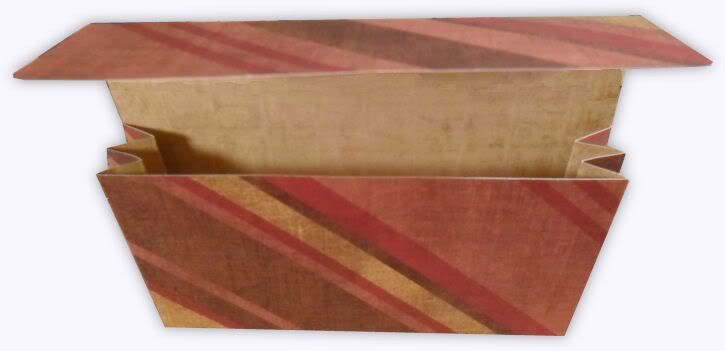
In many ways this is a cut down version of the concertina organiser I've given away in the past, but this time the entire folder can be cut out of just 1 sheet of 12x12 cardstock!

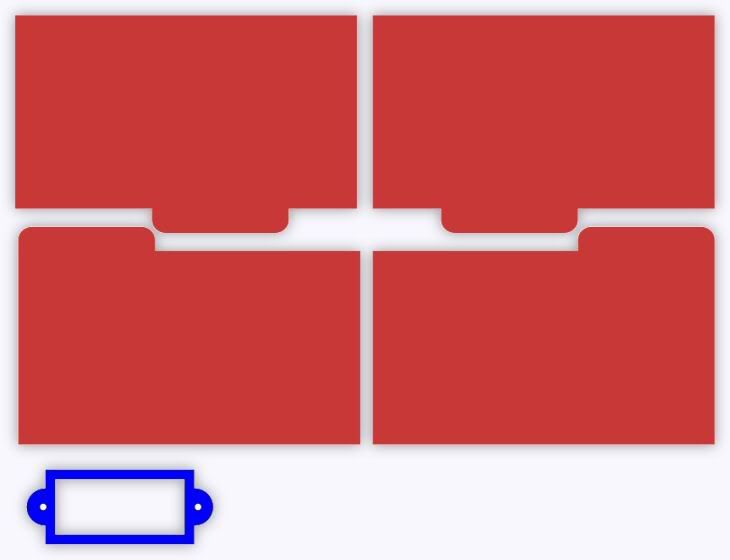
Perfectly sized for 5x3 recipe cards or photos, I've included a separate file containing tabbed dividers so that if it's used for recipes you can separate them into appetizers, entrees, etc, plus a bookplate so that you can put a label of your choice on the front flap.

I've even included a PDF file with recipe cards you can print and cut out!  The base can be left flat, but I have also included fold guides so that the bottom can be accordion folded too - the choice is yours!


Please remember you are only allowed to download this file for your own use and can not share it or distribute it to others in any form. I spend a great deal of time creating my designs, please respect the terms under which they are shared.

Again, this template will be "live" for 1 week. Next week it will be taken down. Don't forget, if you have any requests, pass them on! I can't promise, but I will take suggestions into account when planning future templates.

These files may not be uploaded to a group, forum or website for sale or redistribution, or shared among individuals. They are expressly for the personal use of each person that downloads them from this blog.

There are a few files and I have put them into a zip file to make downloading easier. After saving it, open in the usual way, and drag the files out onto your desktop or wherever you wish to save it.

There are 2 versions of each template:
  • An SVG version which can be imported into the Sure Cuts a Lot or Make the Cut program and then cut out on your Cricut.
  • A DXF version which is Craft Robo friendly, and ready to be imported into your Robomaster software (I'm not a Robo user, so if there are any problems with this, please let me know!)
Simply click on the appropriate button below to download the file!

Any feedback on the templates is more than welcome, and if you have any suggestions for possible future templates you'd like to see, please let me know! If you make anything using one of the templates, please post a link to it here so that others can be inspired by how you've used them!

I hope you like the templates - let me know how you get on! :)

Files © dan99crafter@gmail.com 2011
Related Posts with Thumbnails