Someone messaged me asking for help with an Inkscape problem they were having. They were trying to draw squares using the rectangle tool, but it wasn't working. I got them to send me their file to take a look at, and this video uses their problem as a means of examining the alpha and opacity properties of objects created in Inkscape.
I hope you find it useful! :)
To see a full screen version, click here.

Friday, 22 May 2009

Friday, 15 May 2009
Saturday Freebie #33!
EDIT - I've started to make my files available from my blog again and am adding a new set each week. Check out the "Cutting Files" tab at the top of the page to see which ones are available for download.
It's not rocket science!
 ....though you could be forgiven for thinking so with this funky retro space rocket! There's no need to follow my colour scheme of course, you can cut this out in whatever shades compliment your layout or card!
This is how the pieces are layed out on the mat, just place your pieces of coloured cardstock in the right places and you're all set! (I've coloured the white piece orange here, so you can see it better).
 Please remember you are only allowed to download this file for your own use and may not distribute it to others in any form. I spend a great deal of time creating my designs, please respect the terms under which they are given.
Again, this template will be "live" for 1 week. Next Saturday, it will be taken down, and new ones will replace it. Don't forget, if you have any requests, pass them on! I can't promise, but I will take suggestions into account when planning future templates.
These files may not be uploaded to a group, forum or website for sale or redistribution, or shared among individuals. They are expressly for the personal use of each person that downloads them from this blog.
There is only one file and I have put it into a zip file to make downloading easier. After saving it, open in the usual way, and drag the file out onto your desktop or wherever you wish to save it.
There are 3 versions of each template:
Any feedback on the templates is more than welcome, and if you have any suggestions for possible future templates you'd like to see, please let me know! If you make anything using one of the templates, please post a link to it here so that others can be inspired by how you've used them!
I hope you like the templates - let me know how you get on! :)
It's not rocket science!
 ....though you could be forgiven for thinking so with this funky retro space rocket! There's no need to follow my colour scheme of course, you can cut this out in whatever shades compliment your layout or card!
This is how the pieces are layed out on the mat, just place your pieces of coloured cardstock in the right places and you're all set! (I've coloured the white piece orange here, so you can see it better).
 Please remember you are only allowed to download this file for your own use and may not distribute it to others in any form. I spend a great deal of time creating my designs, please respect the terms under which they are given.
Again, this template will be "live" for 1 week. Next Saturday, it will be taken down, and new ones will replace it. Don't forget, if you have any requests, pass them on! I can't promise, but I will take suggestions into account when planning future templates.
These files may not be uploaded to a group, forum or website for sale or redistribution, or shared among individuals. They are expressly for the personal use of each person that downloads them from this blog.
There is only one file and I have put it into a zip file to make downloading easier. After saving it, open in the usual way, and drag the file out onto your desktop or wherever you wish to save it.
There are 3 versions of each template:
- A printable version (PNG files) that you can import into a program like Word, then resize, print, cut out and use like any other paper template (these are NOT Word files, so don't use File/Open in Word! Use Insert/Picture to bring them into a Word document).
- An SVG version which can be imported into the Sure Cuts a Lot program and then cut out on your Cricut.
- A DXF version which is Craft Robo friendly, and ready to be imported into your Robomaster software (I'm not a Robo user, so if there are any problems with this, please let me know!)
Any feedback on the templates is more than welcome, and if you have any suggestions for possible future templates you'd like to see, please let me know! If you make anything using one of the templates, please post a link to it here so that others can be inspired by how you've used them!
I hope you like the templates - let me know how you get on! :)
Templates © dan99crafter@gmail.com 2009
Thursday, 14 May 2009
Tonight Matthew, I will be feeling....
 I recently got a copy of Kelly Rae Roberts' book "Taking Flight" which includes several step-by-step mixed-media projects. I found them pretty inspiring, so I thought I'd have a try for myself! :)
I didn't have all the right supplies, and didn't copy the project down to the finest detail, but I'm pretty happy with how it turned out. I'm certainly not the world's greatest painter, but hopefully with more practice I'll improve a little!
The body was a collage of small squares of patterened paper which was then overpainted. The background is acrylic paint, along with some stamping (though to be pretty honest the stamping is a bit too subtle, so although I can see it, you may not! lol)
Anyway, there you have it, my first mixed-media piece. I'm sure there'll be more to come in the future! Click on the image for a larger view.
(Oh, I've had a couple of messages asking "who's Matthew?". There's a tv show here in the UK called Stars in their Eyes (maybe you have it in other countries too, I dunno) where people impersonate a famous singer and the public vote on who was most like the original. Each time before they go on stage they say to the presenter, Matthew Kelly, "Tonight Matthew, I'm going to be.....". See? There was method in my madness!:)
Monday, 11 May 2009
Tag Memories

I found this image on my phone today, taken at the end of a holiday last year. I'd taken basic craft supplies with me as I knew the friend I was staying with would be at work a lot of the time. These were all the 6"x3" tags I'd made for a tag book during the trip. They've been seen on my blog individually before, but never all together like this. I thought it was a fun pic, with a different feel to it when they're all seen as a big group, so I thought I'd share it with you! :)
Saturday, 9 May 2009
Saturday Freebie #32!
The Birdhouse in My Soul


[I've started to make my files available from my blog again and am adding a new set each week. Check out the "Cutting Files" tab at the top of the page to see which ones are available for download.]
Following on from the little birdhouses I've been making lately, I decided to give away the template for one of them as a freebie. These are so much fun to make, and simple too. Decorate with paints, inks, stamps or papers, you can just let your imagination run riot! I've chosen to give away the basic template used for the beach-hut style house shown above (the one with the yellow and brown striped roof).
Please remember you are only allowed to download this file for your own use and may not distribute it to others in any form. I spend a great deal of time creating my designs, please respect the terms under which they are given.
Again, this template will be "live" for 1 week. Next Saturday, it will be taken down, and new ones will replace it. Don't forget, if you have any requests, pass them on! I can't promise, but I will take suggestions into account when planning future templates.
These files may not be uploaded to a group, forum or website for sale or redistribution, or shared among individuals. They are expressly for the personal use of each person that downloads them from this blog.
There is only one file and I have put it into a zip file to make downloading easier. After saving it, open in the usual way, and drag the file out onto your desktop or wherever you wish to save it.
There are 3 versions of each template:
Any feedback on the templates is more than welcome, and if you have any suggestions for possible future templates you'd like to see, please let me know! If you make anything using one of the templates, please post a link to it here so that others can be inspired by how you've used them!
I hope you like the templates - let me know how you get on! :)



[I've started to make my files available from my blog again and am adding a new set each week. Check out the "Cutting Files" tab at the top of the page to see which ones are available for download.]
Following on from the little birdhouses I've been making lately, I decided to give away the template for one of them as a freebie. These are so much fun to make, and simple too. Decorate with paints, inks, stamps or papers, you can just let your imagination run riot! I've chosen to give away the basic template used for the beach-hut style house shown above (the one with the yellow and brown striped roof).
Please remember you are only allowed to download this file for your own use and may not distribute it to others in any form. I spend a great deal of time creating my designs, please respect the terms under which they are given.
Again, this template will be "live" for 1 week. Next Saturday, it will be taken down, and new ones will replace it. Don't forget, if you have any requests, pass them on! I can't promise, but I will take suggestions into account when planning future templates.
These files may not be uploaded to a group, forum or website for sale or redistribution, or shared among individuals. They are expressly for the personal use of each person that downloads them from this blog.
There is only one file and I have put it into a zip file to make downloading easier. After saving it, open in the usual way, and drag the file out onto your desktop or wherever you wish to save it.
There are 3 versions of each template:
- A printable version (PNG files) that you can import into a program like Word, then resize, print, cut out and use like any other paper template (these are NOT Word files, so don't use File/Open in Word! Use Insert/Picture to bring them into a Word document).
- An SVG version which can be imported into the Sure Cuts a Lot program and then cut out on your Cricut.
- A DXF version which is Craft Robo friendly, and ready to be imported into your Robomaster software (I'm not a Robo user, so if there are any problems with this, please let me know!)
Any feedback on the templates is more than welcome, and if you have any suggestions for possible future templates you'd like to see, please let me know! If you make anything using one of the templates, please post a link to it here so that others can be inspired by how you've used them!
I hope you like the templates - let me know how you get on! :)
Templates © dan99crafter@gmail.com 2009
Thursday, 30 April 2009
Video Tutorial - Creating a Mother's Day Card in Inkscape
Someone on one of the Cricut groups I belong to asked for some help in making an SVG design she had into a Mother's Day Card. Upon looking at the file I realised there were a few issues with it that might not make it perfect for using in that way.
I created this video for her to show how to alter the file so that it would make a better card, and I include the SVG of the end result here. The original file came from someone else's blog so I can't distribute it here unfortunately, but if you want to mess around trying some of the things I demonstrate, you can use the file I've included on this page!
I hope you find it useful! :)
To see a full screen version, click here.
If you'd like a copy of the file that I produced at the end, you can get it by right clicking and saving here.
I created this video for her to show how to alter the file so that it would make a better card, and I include the SVG of the end result here. The original file came from someone else's blog so I can't distribute it here unfortunately, but if you want to mess around trying some of the things I demonstrate, you can use the file I've included on this page!
I hope you find it useful! :)
To see a full screen version, click here.
If you'd like a copy of the file that I produced at the end, you can get it by right clicking and saving here.

A Home Fit for the Obamas?
Well, probably not! It IS a white house, but it's nowhere near as grand as THE White House! :)
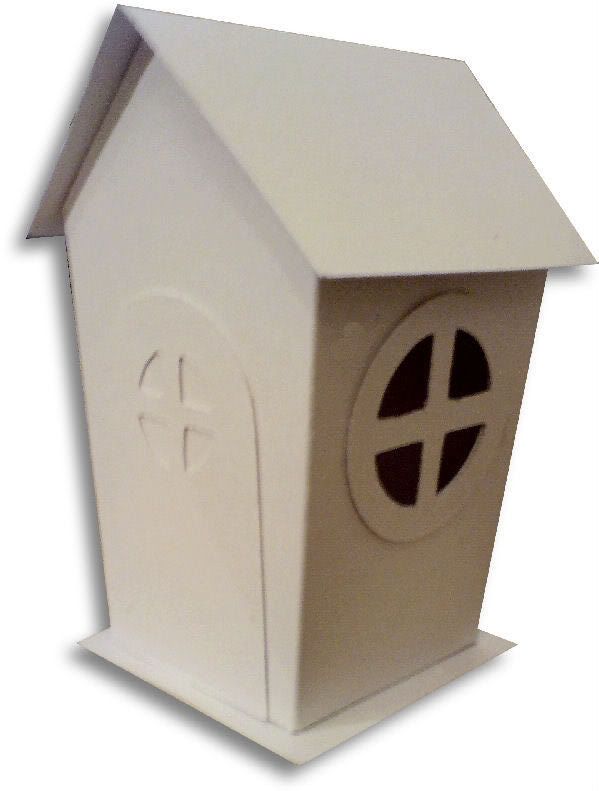
This is the latest incarnation based around my bird house design, cut on the Cricut. The door doesn't show up too well on this photo, but your imagination can fill in the blanks! There are also windows on both sides of the house. Click on the image for a larger view.
Wednesday, 29 April 2009
They say things come in 3s.....
....and it's certainly true of these Cricut bird houses. This is the 3rd and final one that I made on Sunday while hanging out with my friend Hels. This is also the last one that was cut using the original design - I have adjusted it again today, hopefully I can show the new design on here in the next few days!
Like the "Time" themed one that I made for Hels' Sunday Stamper challenge, this one has also been painted with acrylic paint applied with a moist baby wipe, and then stamped with versafine ink. The moon on one side is simply the circle cut out from the front of the bird house, with some shading applied on one edge. Click on an image for a larger view.

Like the "Time" themed one that I made for Hels' Sunday Stamper challenge, this one has also been painted with acrylic paint applied with a moist baby wipe, and then stamped with versafine ink. The moon on one side is simply the circle cut out from the front of the bird house, with some shading applied on one edge. Click on an image for a larger view.

Tuesday, 28 April 2009
Ain't Life a Beach?
Another day, another of my Cricut bird houses, this time with a beach hut feel to it. I'm not yet completely happy with the design of this file, so I'll continue to tweak it a little.Notice that this one doesn't have the scalloped roof that yesterday's did - I'm still deciding which I prefer!
Sunday, 26 April 2009
All of a Twitter with Sunday Stamper
Sundays mean only one thing in our house.... Sunday Stamper! The theme for this weeks challenge is "Time After Time", so I made this bird house on a clock theme.
The house was painted with acrylic paints, then stamped with versafine inks. Ta for taking a look! :)
Whoops! Forgot to mention, I designed the bird house in Inkscape, then cut it out with SCAL on the Cricut.

The house was painted with acrylic paints, then stamped with versafine inks. Ta for taking a look! :)
Whoops! Forgot to mention, I designed the bird house in Inkscape, then cut it out with SCAL on the Cricut.

Subscribe to:
Posts
(
Atom
)
