When I was making last night's video, I thought to myself "maybe some people will wonder how Inkscape always starts up with a 12x12 page on my computer" and thought I might do a short video on how to set that up. Then today, someone asked about that very thing, so I knew it was a good idea! :)
UPDATE April 2015
I received a comment on this post today, saying that this technique no longer works on Inkscape v. 0.91 (the current latest version at time of writing). I have stuck with version 0.48 ever since I installed it so I thought I'd better install the new version and check it out for myself! I installed v. 0.91 and the process for setting up the default page size to 12", as shown in the video below, still works just fine as far as I can see, it's worked for me anyway.

Tuesday, 13 January 2009

Monday, 12 January 2009
Video Tutorial - Creating Word Books in Inkscape
Following several questions in various groups I belong to, I've decided to make this video. There are several ways of making word books like these, so I stress that this is my way of doing it, others may do it differently! :) Although I mention Sure Cuts a Lot frequently during the video, obviously you could save your files as DXF and use them to cut on the Craft Robo or related machines.
If you want to see a full screen version of this, click here.
It was a *really* tight squeeze fitting this into the 10 minute limit, so I had to remove the title page and opening introductory comments, so forgive me for that! :)
If you want to see a full screen version of this, click here.
It was a *really* tight squeeze fitting this into the 10 minute limit, so I had to remove the title page and opening introductory comments, so forgive me for that! :)
Saturday, 10 January 2009
Saturday Freebie #30!
How many envelopes does it take to change a lightbulb?*
 [Edit - These files are no longer available here. Email me to find out how to access earlier designs!]
This week there are 3 cute envelope designs for you to download!
Obviously perfect for birthday and greetings cards, these envelopes could be used as the basis for an envelope book, or why not use them to hold photos or ephemera on a scrapbooking page?
Designed in the perfect proportions for cutting at A2 size, they can be resized or stretched to cut any size you wish, even square!
Again, these templates will be "live" for 1 week. Next Saturday, they will be taken down, and new ones will replace them. Don't forget, if you have any requests, pass them on! I can't promise, but I will take suggestions into account when planning future templates.
These files may not be uploaded to a group, forum or website for sale or redistribution, or shared among individuals. They are expressly for the personal use of each person that downloads them from this blog.
There are 3 files and I have put them into a zip file to make downloading easier. After saving it, open in the usual way, and drag the templates out onto your desktop or wherever you wish to save them.
There are 3 versions of each template:
Any feedback on the templates is more than welcome, and if you have any suggestions for possible future templates you'd like to see, please let me know! If you make anything using one of the templates, please post a link to it here so that others can be inspired by how you've used them!
I hope you like the templates - let me know how you get on! :)
 [Edit - These files are no longer available here. Email me to find out how to access earlier designs!]
This week there are 3 cute envelope designs for you to download!
Obviously perfect for birthday and greetings cards, these envelopes could be used as the basis for an envelope book, or why not use them to hold photos or ephemera on a scrapbooking page?
Designed in the perfect proportions for cutting at A2 size, they can be resized or stretched to cut any size you wish, even square!
Again, these templates will be "live" for 1 week. Next Saturday, they will be taken down, and new ones will replace them. Don't forget, if you have any requests, pass them on! I can't promise, but I will take suggestions into account when planning future templates.
These files may not be uploaded to a group, forum or website for sale or redistribution, or shared among individuals. They are expressly for the personal use of each person that downloads them from this blog.
There are 3 files and I have put them into a zip file to make downloading easier. After saving it, open in the usual way, and drag the templates out onto your desktop or wherever you wish to save them.
There are 3 versions of each template:
- A printable version (PNG files) that you can import into a program like Word, then resize, print, cut out and use like any other paper template (these are NOT Word files, so don't use File/Open in Word! Use Insert/Picture to bring them into a Word document).
- An SVG version which can be imported into the Sure Cuts a Lot program and then cut out on your Cricut.
- A DXF version which is Craft Robo friendly, and ready to be imported into your Robomaster software (I'm not a Robo user, so if there are any problems with this, please let me know!)
Any feedback on the templates is more than welcome, and if you have any suggestions for possible future templates you'd like to see, please let me know! If you make anything using one of the templates, please post a link to it here so that others can be inspired by how you've used them!
I hope you like the templates - let me know how you get on! :)
Templates © dan99crafter@gmail.com 2008
Saturday, 3 January 2009
Saturday Freebie #29!
A pocketful of .... pockets!
 [These files are no longer available from this site. Email me for details on how to access earlier designs!]
After a break for the holidays, Saturday's free cutting files are back!
This week there are 3 cute library pockets for you to download!
 Perfect for holding journaling cards on a scrapbook page, why not use them to add interactivity and dimension to your papercraft projects? They work wonderfully for holding gift cards or money inside a greetings card, or for tucking away a personal message inside a card or mini-book project!
There are 3 to choose from, a lattice, window or scallop versions. If you want a plain pocket, just cut the lattice or window pocket with the blackout feature!
Again, these templates will be "live" for 1 week. Next Saturday, they will be taken down, and new ones will replace them. Don't forget, if you have any requests, pass them on! I can't promise, but I will take suggestions into account when planning future templates.
These files may not be uploaded to a group, forum or website for sale or redistribution, or shared among individuals. They are expressly for the personal use of each person that downloads them from this blog.
There is only one file but I have put it into a zip file to make downloading easier. After saving it, open in the usual way, and drag the templates out onto your desktop or wherever you wish to save them.
There are 3 versions of each template:
Any feedback on the templates is more than welcome, and if you have any suggestions for possible future templates you'd like to see, please let me know! If you make anything using one of the templates, please post a link to it here so that others can be inspired by how you've used them!
I hope you like the templates - let me know how you get on! :)
 [These files are no longer available from this site. Email me for details on how to access earlier designs!]
After a break for the holidays, Saturday's free cutting files are back!
This week there are 3 cute library pockets for you to download!
 Perfect for holding journaling cards on a scrapbook page, why not use them to add interactivity and dimension to your papercraft projects? They work wonderfully for holding gift cards or money inside a greetings card, or for tucking away a personal message inside a card or mini-book project!
There are 3 to choose from, a lattice, window or scallop versions. If you want a plain pocket, just cut the lattice or window pocket with the blackout feature!
Again, these templates will be "live" for 1 week. Next Saturday, they will be taken down, and new ones will replace them. Don't forget, if you have any requests, pass them on! I can't promise, but I will take suggestions into account when planning future templates.
These files may not be uploaded to a group, forum or website for sale or redistribution, or shared among individuals. They are expressly for the personal use of each person that downloads them from this blog.
There is only one file but I have put it into a zip file to make downloading easier. After saving it, open in the usual way, and drag the templates out onto your desktop or wherever you wish to save them.
There are 3 versions of each template:
- A printable version (PNG files) that you can import into a program like Word, then resize, print, cut out and use like any other paper template (these are NOT Word files, so don't use File/Open in Word! Use Insert/Picture to bring them into a Word document).
- An SVG version which can be imported into the Sure Cuts a Lot program and then cut out on your Cricut.
- A DXF version which is Craft Robo friendly, and ready to be imported into your Robomaster software (I'm not a Robo user, so if there are any problems with this, please let me know!)
Any feedback on the templates is more than welcome, and if you have any suggestions for possible future templates you'd like to see, please let me know! If you make anything using one of the templates, please post a link to it here so that others can be inspired by how you've used them!
I hope you like the templates - let me know how you get on! :)
Templates © dan99crafter@gmail.com 2008
Friday, 2 January 2009
Moo Two!
A friend asked me to make her one of my framed "moo" pictures for her for Christmas. I used the file I gave away here recently, but I couldn't post the finished result here in case she saw it, so here it is now!
The mount was cut on the Cricut using Sure Cuts a Lot, and then I created individual stamped pieces to go behind each "hole". The frame had a bit of space behind the glass, so I was able to fit in the metal embellishments!

The mount was cut on the Cricut using Sure Cuts a Lot, and then I created individual stamped pieces to go behind each "hole". The frame had a bit of space behind the glass, so I was able to fit in the metal embellishments!

Saturday, 13 December 2008
Saturday Freebie #28!
Look, no glue!
 [Edit - This file is no longer available from this site. Email me for details on how to get earlier files!]
It's Saturday again, and so it's time for more original free designs for you to download and cut out!
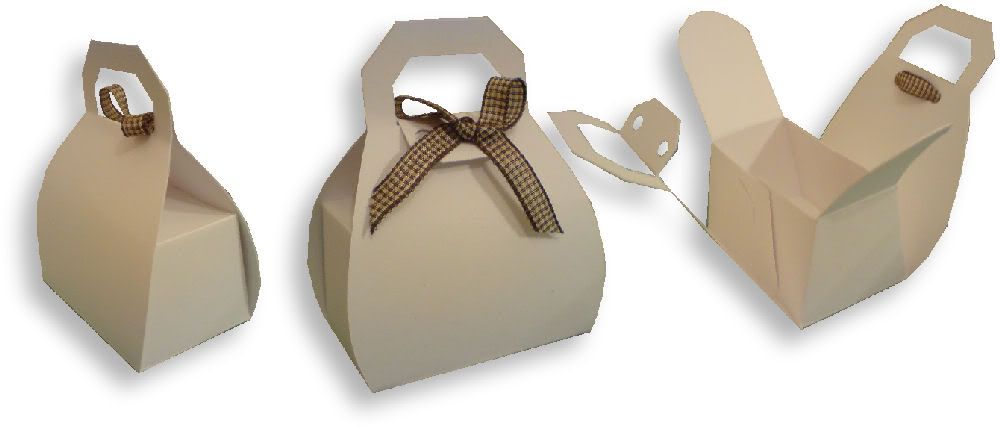
This purse-shaped gift box is really quick to assemble, because you don't need to use any adhesive! It's perfect for wedding or party favours, or why not put a couple of nice chocolates inside each one and use them as place cards on your festive table?
 Click on any image to see a larger view.
Again, these templates will be "live" for 1 week. Next Saturday, they will be taken down, and new ones will replace them. Don't forget, if you have any requests, pass them on! I can't promise, but I will take suggestions into account when planning future templates.
These files may not be uploaded to a group, forum or website for sale or redistribution, or shared among individuals. They are expressly for the personal use of each person that downloads them from this blog.
There is only one file but I have put it into a zip file to make downloading easier. After saving it, open in the usual way, and drag the templates out onto your desktop or wherever you wish to save them.
There are 3 versions of each template:
Any feedback on the templates is more than welcome, and if you have any suggestions for possible future templates you'd like to see, please let me know! If you make anything using one of the templates, please post a link to it here so that others can be inspired by how you've used them!
I hope you like the templates - let me know how you get on! :)
 [Edit - This file is no longer available from this site. Email me for details on how to get earlier files!]
It's Saturday again, and so it's time for more original free designs for you to download and cut out!
This purse-shaped gift box is really quick to assemble, because you don't need to use any adhesive! It's perfect for wedding or party favours, or why not put a couple of nice chocolates inside each one and use them as place cards on your festive table?
 Click on any image to see a larger view.
Again, these templates will be "live" for 1 week. Next Saturday, they will be taken down, and new ones will replace them. Don't forget, if you have any requests, pass them on! I can't promise, but I will take suggestions into account when planning future templates.
These files may not be uploaded to a group, forum or website for sale or redistribution, or shared among individuals. They are expressly for the personal use of each person that downloads them from this blog.
There is only one file but I have put it into a zip file to make downloading easier. After saving it, open in the usual way, and drag the templates out onto your desktop or wherever you wish to save them.
There are 3 versions of each template:
- A printable version (PNG files) that you can import into a program like Word, then resize, print, cut out and use like any other paper template (these are NOT Word files, so don't use File/Open in Word! Use Insert/Picture to bring them into a Word document).
- An SVG version which can be imported into the Sure Cuts a Lot program and then cut out on your Cricut.
- A DXF version which is Craft Robo friendly, and ready to be imported into your Robomaster software (I'm not a Robo user, so if there are any problems with this, please let me know!)
Any feedback on the templates is more than welcome, and if you have any suggestions for possible future templates you'd like to see, please let me know! If you make anything using one of the templates, please post a link to it here so that others can be inspired by how you've used them!
I hope you like the templates - let me know how you get on! :)
Templates © dan99crafter@gmail.com 2008
Wednesday, 10 December 2008
Video Tutorial - Removing Parts of an SVG Image
In one of the online groups I belong to (SureCutsALotUsers) there has recently been some discussion about ways to remove parts of an SVG image using the Inkscape program. I decided to make this short video to demonstrate a couple of the methods I use.
I hope you find it helpful!
I hope you find it helpful!
Tuesday, 9 December 2008
Video Tutorial - Sizing my Moo Frame in SCAL
A few people have sent me questions about how to correctly size this file in SCAL. I used 8.5x11 cardstock and cut the file at 8x10 inches with no problem.
I've created a quick video to demonstrate the process. I know that when I host my videos in Photobucket, some of you can't see them. The quality of the video is so much better that I am continuing with that, but I have also included a Google Video version for those who may have problems! If you can see both, notice the quality difference - Google Video is fuzzy by comparison! You can see why I prefer to use Photobucket for my videos! :)
Photobucket Video
Google Video
I've created a quick video to demonstrate the process. I know that when I host my videos in Photobucket, some of you can't see them. The quality of the video is so much better that I am continuing with that, but I have also included a Google Video version for those who may have problems! If you can see both, notice the quality difference - Google Video is fuzzy by comparison! You can see why I prefer to use Photobucket for my videos! :)
Photobucket Video
Google Video
Crafty Gift Idea and Freebie!
A-moo-se yourself with this idea!
 [Edit - These files are no longer available from this site. Email me for details of how to access past files.]
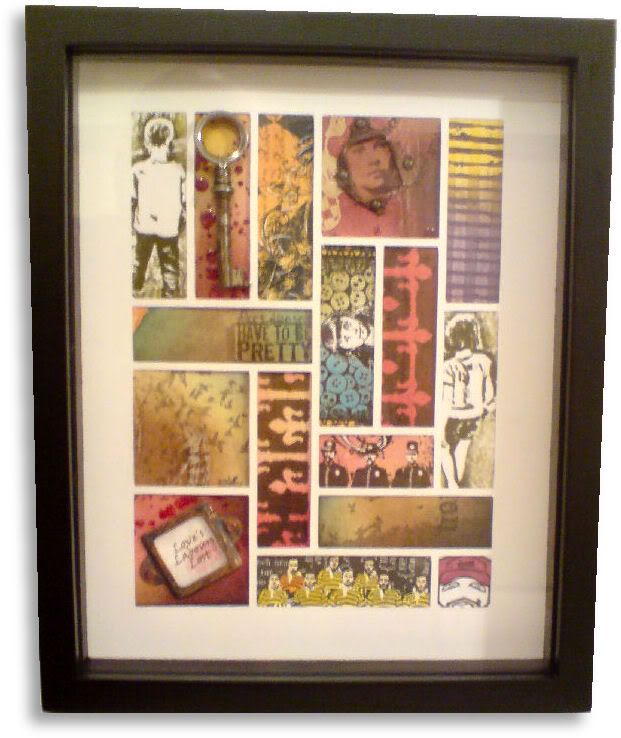
Recently I had a fun day with friends doing our yearly "Secret Santa". We each had picked a name "out of the hat" and we had to make a gift for that person. I cut this mount on the Cricut and created little pieces of art to go behind each space. I think it looks awesome, but then I'm biased! LOL
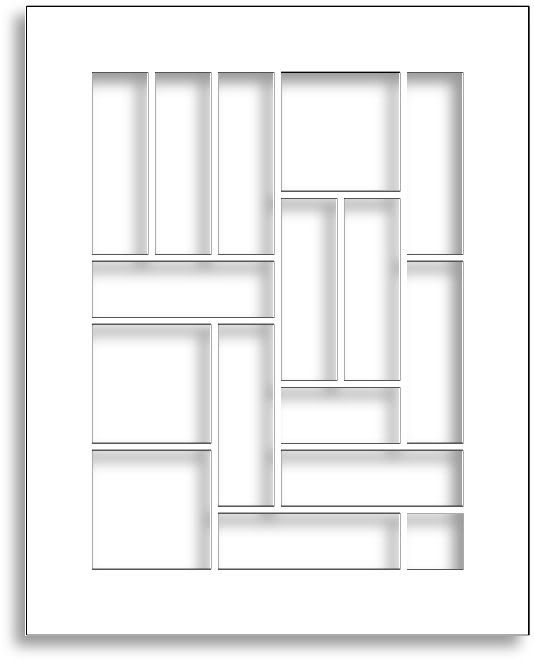
If you cut this at 8x10 inches, which I did, you have spaces for the following pieces:
11 "moos" - a moo is a 1x3 inch piece of artwork
3 "twinchies" - 2x2 inches
1 "inchie" - 1x1 inch
1 half-twinchie - 1 x 2 inch.
It's a great way to use up little offcuts of card or paper or stamped images you have left over from other projects, don't you think?
 Again, these templates will be "live" for 1 week. Next Saturday, they will be taken down, and new ones will replace them. Don't forget, if you have any requests, pass them on! I can't promise, but I will take suggestions into account when planning future templates.
These files may not be uploaded to a group, forum or website for sale or redistribution, or shared among individuals. They are expressly for the personal use of each person that downloads them from this blog.
There one file but I have put it into a zip file to make downloading easier. After saving it, open in the usual way, and drag the templates out onto your desktop or wherever you wish to save them.
There are 3 versions of each template:
Any feedback on the templates is more than welcome, and if you have any suggestions for possible future templates you'd like to see, please let me know! If you make anything using one of the templates, please post a link to it here so that others can be inspired by how you've used them!
I hope you like the templates - let me know how you get on! :)
 [Edit - These files are no longer available from this site. Email me for details of how to access past files.]
Recently I had a fun day with friends doing our yearly "Secret Santa". We each had picked a name "out of the hat" and we had to make a gift for that person. I cut this mount on the Cricut and created little pieces of art to go behind each space. I think it looks awesome, but then I'm biased! LOL
If you cut this at 8x10 inches, which I did, you have spaces for the following pieces:
11 "moos" - a moo is a 1x3 inch piece of artwork
3 "twinchies" - 2x2 inches
1 "inchie" - 1x1 inch
1 half-twinchie - 1 x 2 inch.
It's a great way to use up little offcuts of card or paper or stamped images you have left over from other projects, don't you think?
 Again, these templates will be "live" for 1 week. Next Saturday, they will be taken down, and new ones will replace them. Don't forget, if you have any requests, pass them on! I can't promise, but I will take suggestions into account when planning future templates.
These files may not be uploaded to a group, forum or website for sale or redistribution, or shared among individuals. They are expressly for the personal use of each person that downloads them from this blog.
There one file but I have put it into a zip file to make downloading easier. After saving it, open in the usual way, and drag the templates out onto your desktop or wherever you wish to save them.
There are 3 versions of each template:
- A printable version (PNG files) that you can import into a program like Word, then resize, print, cut out and use like any other paper template (these are NOT Word files, so don't use File/Open in Word! Use Insert/Picture to bring them into a Word document).
- An SVG version which can be imported into the Sure Cuts a Lot program and then cut out on your Cricut.
- A DXF version which is Craft Robo friendly, and ready to be imported into your Robomaster software (I'm not a Robo user, so if there are any problems with this, please let me know!)
Any feedback on the templates is more than welcome, and if you have any suggestions for possible future templates you'd like to see, please let me know! If you make anything using one of the templates, please post a link to it here so that others can be inspired by how you've used them!
I hope you like the templates - let me know how you get on! :)
Templates © dan99crafter@gmail.com 2008
Saturday, 6 December 2008
Saturday Freebie #27!
 The Bear Essentials!
[Edit - These files are no longer available from this site. Email me for details on how to access my past files.]
It's Saturday again, and so it's time for more original free designs for you to download and cut out!
This is my first paper-piecing template, I hope you like it!
How cute is this teddy? Perfect for cards and scrapbook pages, or why not cut it out extra large and use it to decorate the wall of a child's bedroom?
Click on any image to see a larger view.
I've had no time to make samples this week, so why don't you show me how YOU use them?
Whether it be on a scrapbook page, a card or wall art, I'm sure you'll find some creative way to use this design!
 Again, these templates will be "live" for 1 week. Next Saturday, they will be taken down, and new ones will replace them. Don't forget, if you have any requests, pass them on! I can't promise, but I will take suggestions into account when planning future templates.
These files may not be uploaded to a group, forum or website for sale or redistribution, or shared among individuals. They are expressly for the personal use of each person that downloads them from this blog.
There one file but I have put it into a zip file to make downloading easier. After saving it, open in the usual way, and drag the templates out onto your desktop or wherever you wish to save them.
There are 3 versions of each template:
- A printable version (PNG files) that you can import into a program like Word, then resize, print, cut out and use like any other paper template (these are NOT Word files, so don't use File/Open in Word! Use Insert/Picture to bring them into a Word document).
- An SVG version which can be imported into the Sure Cuts a Lot program and then cut out on your Cricut.
- A DXF version which is Craft Robo friendly, and ready to be imported into your Robomaster software (I'm not a Robo user, so if there are any problems with this, please let me know!)
Any feedback on the templates is more than welcome, and if you have any suggestions for possible future templates you'd like to see, please let me know! If you make anything using one of the templates, please post a link to it here so that others can be inspired by how you've used them!
I hope you like the templates - let me know how you get on! :)
Templates © dan99crafter@gmail.com 2008
Subscribe to:
Posts
(
Atom
)
